This year started awesome with the introduction of a new MP authoring tool for SCOM, released by Silect.
It has a very descriptive name :), MP Author.
I really hope this will enable more people to create useable monitoring functionality in Operations Manager.
While I still don't understand why Microsoft has not solved the issue in which the Authoring role within OpsMgr can't use the Monitoring Templates (startingpoint for authoring?), this tool could be a solution for those who do not feel comfortable with the current Authoring Pane or VSAE.
Read about it at: http://blogs.technet.com/b/momteam/archive/2014/01/13/mp-blog-the-right-tool-for-the-right-job.aspx
(The SCOM 2012 Operations Console is a prerequisite for installing MP Author)
Friday, January 24, 2014


Wednesday, August 7, 2013
SCOM 2012 R2 Cross-Platform Agent: R2 vs SP1
In this blog post I will show what's different under the hood (at first glance) between the cross-platform agents of OpsMgr 2012 R2 and OpsMgr 2012 SP1. This post will probably be updated as I'll find more to share.
Both agents are running on Ubuntu 12.04.1 LTS. I use the root account for administration. I know, I should not use it, but hey what the heck. It's just a test environment. The SSH client I use is PuTTY.
When you run the command "scxadmin -status" you get the same kind of response. But you can see that the programs are replaced with OMI versions.
R2
SP1

Command: scxadmin -version
R2
SP1
SP1
SP1
Both agents are running on Ubuntu 12.04.1 LTS. I use the root account for administration. I know, I should not use it, but hey what the heck. It's just a test environment. The SSH client I use is PuTTY.
Status Information
In both versions the 'scxadmin' tool is available.When you run the command "scxadmin -status" you get the same kind of response. But you can see that the programs are replaced with OMI versions.
R2
 |
| Note the change in server and agent name (omi) |

Version differences
Retrieved with scxadmin (still available in R2)Command: scxadmin -version
R2
 |
| Version: 1.5.0-114 |
 |
| Agent Management (Console) |
SP1
 |
| 1.4.0-906 |
 |
| Agent Management (Console) |
Files & Folders
There are noticeable differences in the binaries used in R2 and SP1. This is because of the change from OpenPegasus to OMI. Some binaries are still used but renamed, like 'cimcli'.
R2
 |
| R2: Less binaries than SP1, provider binaries removed. OMI has other tools for that. See the OMI getting started guide: download here |
 |
| SP1: More and other binaries than R2 |
Using WS-Man
Microsoft stated that the upgrade to R2 is seamless except when using custom providers. So testing the response with WS-Man should return the same result.
For the test I use an Invoke example which I used earlier.
The property StdOut is still the same. This is the result of the command 'uname -a'.
The result is the same, but the XmlElement which is returned by the server has some slight body changes.
The XML response (minor diffs):
n1 => p
true => TRUE
URI => Changed to DMTF. So it looks like the interface is committed to use the DMTF schema.
R2
 |
| R2 WS-Man result: DMTF schema used |
 |
| SP1 WS-Man result: Microsoft schema used |
CIMCLI issue in R2
The cimcli tool is used in both OpenPegasus and OMI.
Microsoft renamed the tool from 'scxcimcli' to just 'cimcli'.
I found that the cimcli tool contained in the R2 agent (Ubuntu) does not work. SP1 does. It can't find the libomiclient.so file. Currently I haven't tested other agents for the other OS's to see if those contain the same issue. (Downloading Suse Enterprise Linux as we speak)
I tried all kind of things to get cimcli to work, but it keeps failing to run. I copied the lib directory contents to the bin contents, added omicli.conf to the conf directory, added .omiclirc to the cimcli directory.
Got that information from: http://cvs.opengroup.org/cgi-bin/viewcvs-omi.cgi/*checkout*/omi/doc/omi/omi.html?rev=HEAD&content-type=text/html#TOC16
Command: (scx)cimcli ns
This enumerates the available namespaces of the CIM server.
R2
 |
| Failure: libomiclient.so is missing |
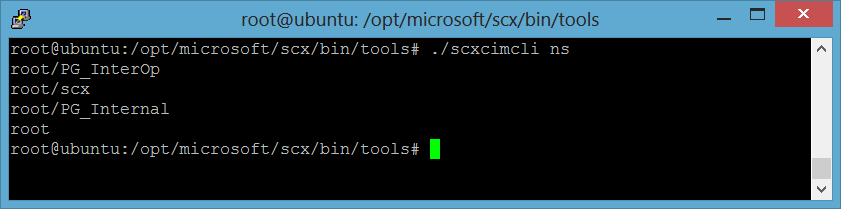 |
| Microsoft's scx namespace. Also note the two Pegasus (PG) namespaces |
If you have any feedback on my findings, please let me know.
Tuesday, August 6, 2013
SCOM 2012 R2 Cross-Platform (XPlat) OMI changes
OMI replaces OpenPegasus
One of the changes in the R2 release (expected fall 2013) is the change of management platform for the cross-platform agents to monitor Linux and UNIX systems. The supported cross-platform systems are: Linux (RedHat, SUSE, CentOS, Debian, Oracle and Ubuntu) and UNIX (AIX, HP-UX and Solaris).In the current 2012 version the cross-platform agents are built-upon the OpenPegasus standard. This is an open-source implementation of DMTF CIM and WBEM.
With the focus on becoming a Cloud OS, Microsoft needed a new abstraction layer for standard-based management which could be used to manage different kind of devices and abstractions (from cloud to physical device). The current standard had some caveats that did not line up with Microsoft standards-based management vision for the future.
That’s why Microsoft decided to use OMI* (Open Management Infrastructure) to replace OpenPegasus in the cross-platform agents.

If you want to know more about Microsoft’s reasons for this change, read their blog: http://blogs.technet.com/b/windowsserver/archive/2012/06/28/open-management-infrastructure.aspx
Besides the benefits of using a new standards-based management interface for top-to-bottom management, OMI performs significantly better than its predecessor. The footprint is smaller, making it better suitable for mobile devices.

* Previously known as NanoWBEM
More info on OMI: https://collaboration.opengroup.org/omi/
Seamless upgrade
Upgrading to SCOM 2012 R2 is seamless. The same goes for your own cross-platform Management Packs using the standard Microsoft provider (root\scx). As long as you used the Management Pack Types and provider which came out-of-the-box there is nothing to be worried about.
What's affected?
Management Packs that use OpenPegasus providers will not be compatible with the new agents. Vendors or customers who have written custom OpenPegasus provider have to rebuild their management packs to be based on the new OMI framework. If customers don’t upgrade to those new Management Packs or vendors are unable to redo their Management Packs, your upgrade to SC 2012 R2 will render that monitoring unusable, and errors might occur. For what I've seen, management packs from vendors like NiCE and Bridgeways use their own custom OpenPegasus providers.
Other options
 Some cross-platform management packs do not make use of custom providers. One of those is the Oracle MP from OpsLogix.
SCOM 2012 R2 (Preview) changes
I'm currently looking into the changes coming with the R2 release of SCOM 2012 R2.
A lot of new features are presented with this new release. Features like 360 Fabric Monitoring and better integration with VMM give administrations a complete overview of their private cloud. Extended with the updated Azure management pack, you now can complement this overview.
User experience is enhanced by improved dashboards performance. A very nice welcome feature is Java APM (Application Performance Monitoring), this will have the same experience as the existing .NET APM monitoring capabilities. Java APM allows you to monitor application performance from a server and client side perspective.
For what I've read about Java APM, it's not exactly the same as .NET APM, (byte-code instrumentation as someone called it)
Together with enhanced IntelliTrace support and improved TFS integration this will help your DevOps strategy to bring development and application management closer together.
Microsoft decided to change the cross-platform management interface. This could impact you, if you develop cross-platform management packs. See my next blog for that.
Want to see it for yourself? Download the evaluation package: http://technet.microsoft.com/en-US/evalcenter/dn205295.aspx
Need to convince your manager to get budget for upgrading to R2? Get the white paper here :)
A lot of new features are presented with this new release. Features like 360 Fabric Monitoring and better integration with VMM give administrations a complete overview of their private cloud. Extended with the updated Azure management pack, you now can complement this overview.
User experience is enhanced by improved dashboards performance. A very nice welcome feature is Java APM (Application Performance Monitoring), this will have the same experience as the existing .NET APM monitoring capabilities. Java APM allows you to monitor application performance from a server and client side perspective.
For what I've read about Java APM, it's not exactly the same as .NET APM, (byte-code instrumentation as someone called it)
Together with enhanced IntelliTrace support and improved TFS integration this will help your DevOps strategy to bring development and application management closer together.
Microsoft decided to change the cross-platform management interface. This could impact you, if you develop cross-platform management packs. See my next blog for that.
Want to see it for yourself? Download the evaluation package: http://technet.microsoft.com/en-US/evalcenter/dn205295.aspx
Need to convince your manager to get budget for upgrading to R2? Get the white paper here :)
Friday, August 2, 2013
SCOM: Invoke method on cross-platform agents with PowerShell
In this post i'll show you how a cross-platform agent can be tested. This is something which Daniele Muscetta already found out. But I also wanted to know how I could troubleshoot cross-platform agents, to test, for example, why a specific workflow like 'run a ssh command' would not work from a management pack. And yes, PowerShell can be used for that, with the Invoke-WSManAction cmdlet.
About Cross-Platform Agents
For those who ever have worked with the cross-platform agents in SCOM, you probably know that they work different than the Windows agents.
Where Windows Agents run their workflows locally on the client, the workflows for cross-platform/xplat agents are ran from the Management Servers.
Windows systems support different ways of remote connecting, not present in cross-platform systems. Cross-platform agents are actually listeners based on WS-Man, Web Services-Management. This makes use of a SOAP-based protocol.
When the Management Server starts a workflow, it connects to the cross-platform agent through WS-Man. It retrieves the required information and processes the returned information.
Connecting with cross-platform agents
I'll won't copy the post of Daniele Muscetta here. These are the main requirements when connecting from any client other than a management server. If you don't use this option, you'll have to add the agent to the trusted hosts list of the WS-Man client on the computer you are working on and allow unencrypted traffic.
To test a cross-platform agent with PowerShell I use the following cmdlets:


About Cross-Platform Agents
For those who ever have worked with the cross-platform agents in SCOM, you probably know that they work different than the Windows agents.
Where Windows Agents run their workflows locally on the client, the workflows for cross-platform/xplat agents are ran from the Management Servers.
Windows systems support different ways of remote connecting, not present in cross-platform systems. Cross-platform agents are actually listeners based on WS-Man, Web Services-Management. This makes use of a SOAP-based protocol.
When the Management Server starts a workflow, it connects to the cross-platform agent through WS-Man. It retrieves the required information and processes the returned information.
Connecting with cross-platform agents
I'll won't copy the post of Daniele Muscetta here. These are the main requirements when connecting from any client other than a management server. If you don't use this option, you'll have to add the agent to the trusted hosts list of the WS-Man client on the computer you are working on and allow unencrypted traffic.
- Connecting over SSL
- Download the agent's certificate (which is signed by the management server) with SCP (use WinSCP or FileZilla)
- Rename to .cer
- Open this certificate on the management server which installed the agent. This is because this server signed the certificate.
- Open the details tab, get the Root CA certificate, export it to a .cer file
- Add certificate to Trusted Root Certificate Authorities on your workstation's computer certificate store.
Or
- Untrusted connection (by default disabled for the WS-Man Windows client)
- Open Powershell (as Administrator)
- Enter: set-item WSMan:\localhost\Client\AllowUnencrypted "true"
- Enter: set-item WSMan:\localhost\Client\TrustedHosts "
"
Time to play
- Test-WSMan - Test whether a connection can be made
- Invoke-WSMan - Invoke an action that is accepted by the agent
Test-WSMan -computer linuxhost.contoso.local -port 1270 -authentication basic -credential (Get-Credential) -UseSSL

The output of the command is show above. The cmdlet shows the properties of the Cross-Platform agent.
Invoke-WSManAction -Action ExecuteCommand -Authentication Basic -ComputerName "linuxhost.contoso.local" -Credential (Get-Credential) -Port 1270 -ResourceURI http://schemas.microsoft.com/wbem/wscim/1/cim-schema/2/SCX_OperatingSystem?__cimnamespace=root/scx -UseSSL -ValueSet @{command="uname -a";timeout=30}
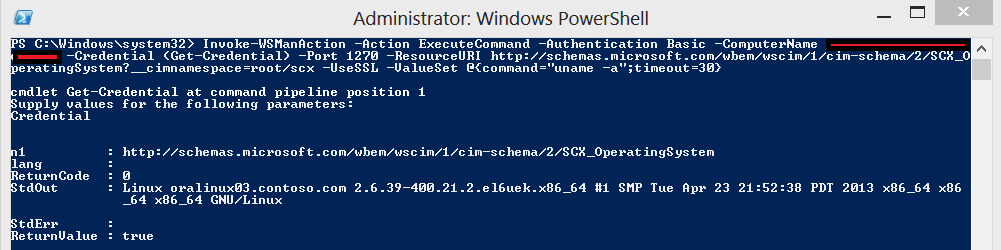
In this example I invoke the action "ExecuteCommand". For this cmdlet to work you need to add a ValueSet. These are the arguments for the ExecuteCommand method. I found the right syntax by trial and error. The need to be entered as a hashtable.
In this case, the arguments are 'command' and 'timeout'.
Technical documentaton about the Methods and the necessary arguments: http://technet.microsoft.com/en-us/library/dd789056.aspx. (not the best documented features sadly).
You can also take a look at the MP library: Microsoft.Unix.Library.mp
In this case, the arguments are 'command' and 'timeout'.
Technical documentaton about the Methods and the necessary arguments: http://technet.microsoft.com/en-us/library/dd789056.aspx. (not the best documented features sadly).
You can also take a look at the MP library: Microsoft.Unix.Library.mp
Links
Tuesday, October 23, 2012
SCOM: Online Management Pack documentation
Today I was working on new Management Pack for SCOM 2012. As I was searching for a base class definition on the internet, I found this website which can be convinient if you need a quick peek at the System Center libraries. This website shows the System Center management packs contents and is easy to browse for class definitions, discoveries, rules and monitors.
Check it out: http://mpdb.azurewebsites.net/
Have fun!
Check it out: http://mpdb.azurewebsites.net/
Have fun!
Tuesday, May 22, 2012
Powershell: Split text file in multiple files
For importing computer entries in SCCM I had a rather big file with 35000 items in it. I wanted to take a phased approach and found a script to split the CSV file based on a number of lines per file. Script Center repository: http://gallery.technet.microsoft.com/scriptcenter/PowerShell-Split-large-log-6f2c4da0
I tweaked the script a little bit, so only the parameters that are necessary are File Name and Number of Lines Per File.
I tweaked the script a little bit, so only the parameters that are necessary are File Name and Number of Lines Per File.
$linecount = 0
$filenumber = 1

$sourcefilename = Read-Host "What is the full path and name of the log file to split? (e.g. D:\mylogfiles\mylog.txt) "
$destinationfolderpath = Split-Path $sourcefilename -parent

$srcfile = gci $sourcefilename
$filebasename = $srcfile.BaseName
$fileext = $srcfile.Extension

Get-Content $sourcefilename | Measure-Object | ForEach-Object { $sourcelinecount = $_.Count }

Write-Host "Your current file size is $sourcelinecount lines long"

$destinationfilesize = Read-Host "How many lines will be in each new split file? "

$maxsize = [int]$destinationfilesize

Write-Host File is $sourcefilename - destination is $destinationfolderpath - new file line count will be $destinationfilesize

Write-Host "Writing part: $destinationfolderpath\$filebasename`_part$filenumber$fileext"
$content = get-content $sourcefilename | % {
 #Add-Content $destinationfolderpath\$filebasename_$filenumber.txt "$_"
 Add-Content $destinationfolderpath\$filebasename`_part$filenumber$fileext "$_"
  $linecount ++
  If ($linecount -eq $maxsize) {
    $filenumber++
    $linecount = 0
    Write-Host "Writing part: $destinationfolderpath\$filebasename`_part$filenumber$fileext"
  }
}
Wednesday, April 18, 2012
System Center 2012 Availability
The last month more and more System Center 2012 product guides, addons and other stuff was released.
Also the availability of the 2012 suite to Volume License Cusomers was already known by the public.
This week at MMS (no I'm not attending) the announcement was made that System Center 2012 is now generally available. So the coming weeks and months, more in-depth product knowledge will be shared Technet, forums, blogs and other media. Now the MVP's can finally share what they know already.
Just read a blog where Microsoft introduced a new console for creating basic management packs for Operations Manager 2007 and 2012: http://systemscentre.blogspot.com/2012/04/visio-management-pack-designer-for.html
Also the availability of the 2012 suite to Volume License Cusomers was already known by the public.
This week at MMS (no I'm not attending) the announcement was made that System Center 2012 is now generally available. So the coming weeks and months, more in-depth product knowledge will be shared Technet, forums, blogs and other media. Now the MVP's can finally share what they know already.
Just read a blog where Microsoft introduced a new console for creating basic management packs for Operations Manager 2007 and 2012: http://systemscentre.blogspot.com/2012/04/visio-management-pack-designer-for.html
Subscribe to:
Posts (Atom)


